Installation reference
Start with copy, run, configure, or first result. Record the operating system, runtime version, package version, test date, exact stage, and sanitized output.
FAQ and support
This page has no sales form. Use the reference channels below for installation documentation, privacy context, and reproducible troubleshooting. Never send credentials or identifiable prospect exports. A useful report names the failed state, expected behavior, observed behavior, sanitized environment, and safe test data.
Start with copy, run, configure, or first result. Record the operating system, runtime version, package version, test date, exact stage, and sanitized output.
Reference review hours: Monday–Friday, 09:00–17:00 UTC. This address is for documentation questions; it does not provide prospect lists, managed sending, or sales demos.
Privacy · Terms · Research notes
Remove API keys, session cookies, tokens, private contact data, and customer identifiers from screenshots and logs. Describe the smallest task that reproduces the behavior.
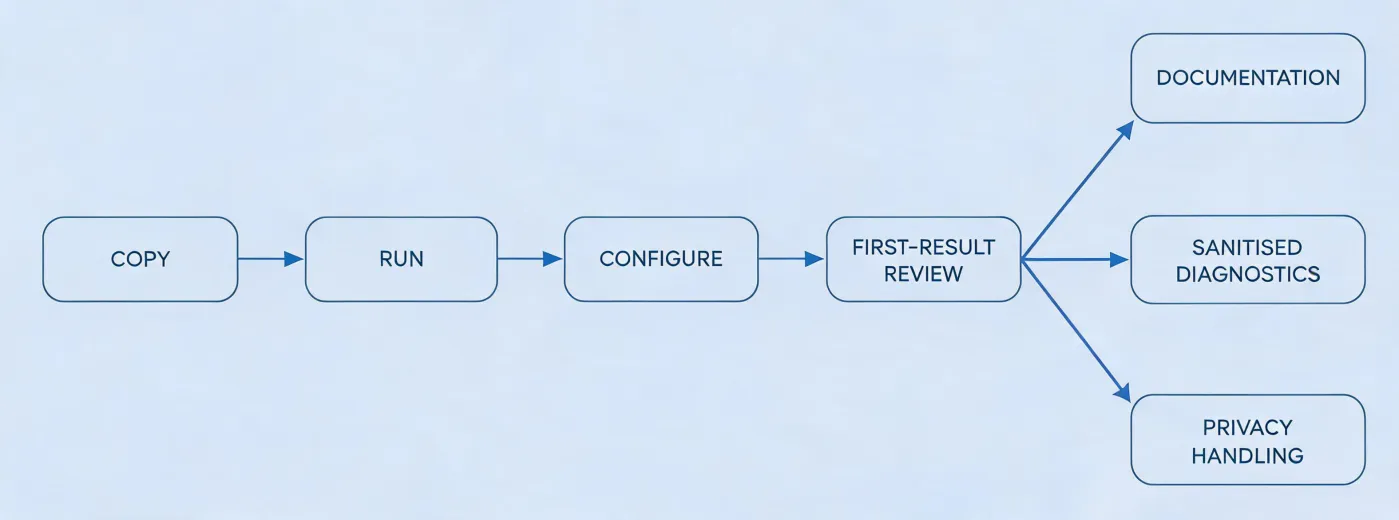
Copying affects only your clipboard. Run in a controlled environment, inspect package behavior, keep credentials in a secret store, and test with known profiles before any downstream use.
npx -y @okki-global/okki-go-taroballFor a useful diagnostic, distinguish installation health from research quality. A completed run does not validate profile freshness, contact verification, permitted use, or relevance. A returned draft does not authorize sending. If the first result is incomplete, report which field is unknown, which source was expected, the observation date, and whether the workflow failed visibly.
Before connecting outreach, require human review of professional identity, role relevance, suppression state, opt-out language, platform policy, applicable regional requirements, and sender controls including SPF, DKIM, and DMARC. No support response can guarantee consent, inbox placement, replies, or commercial fit.
When the test ends, revoke temporary credentials, remove intermediate exports, and follow the package’s documented uninstall path. Retain only the audit data your policy requires, and record who confirmed deletion.